
Smartwatch Sensors Explained: What Your Wrist Actually Measures
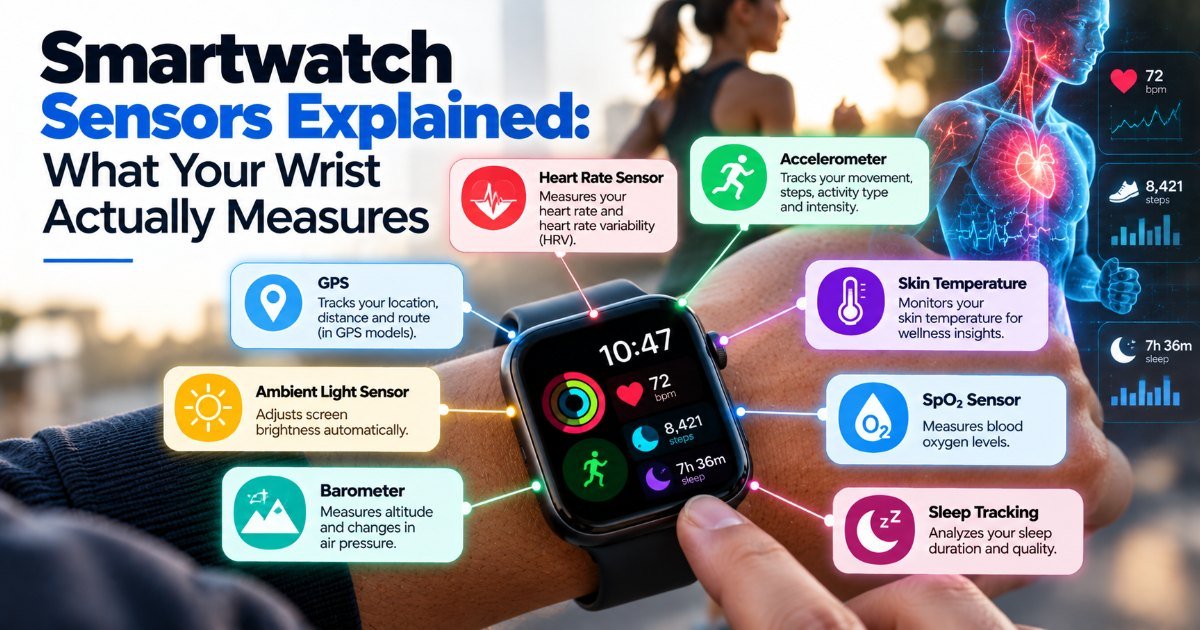
You probably bought your smartwatch because a salesperson said it had "six sensors" and sounded impressive. Six of what, though? And which ones actually matter? That's what we're unpacking here — smartwatch sensors, one by one, with the honest pros and cons.
Let's go sensor by sensor. No marketing fluff.
Heart Rate Monitor (Photoplethysmography, or PPG)
This is the one every smartwatch brags about, and honestly, it's the most misunderstood too.
Here's how it works: green LEDs (sometimes red or infrared) shine through your skin to the blood vessels in your wrist. Blood absorbs light, so as your pulse pushes blood through, the light that bounces back changes. The watch translates that flicker into a heart rate number.
The good news: at rest, it's pretty accurate. Within a few beats per minute of a chest strap in most cases. The Apple Watch Series 10, the Garmin Fenix 8, the Samsung Galaxy Watch Ultra — they all do a solid job when you're sitting still.
The bad news: move around and things get dicey. A tight grip, a tattoo on your wrist, cold skin, or even the way you hold your coffee mug can throw the reading off by 20 beats or more. If you're training seriously, you still want a chest strap. (I've tested this myself. The $30 Polar H10 beat my $400 watch on interval runs, hands down.)
Also worth knowing: continuous heart rate monitoring drains your battery. That 18-hour battery life? Expect closer to 12 if you let it track your pulse nonstop.
Blood Oxygen Sensor (SpO2)
Added to basically every mid-range and premium watch in the last few years. It works alongside the heart rate LEDs — red and infrared light measure how much oxygen your blood is carrying.
Is it useful? For most people, sort of. It can catch rough sleep patterns and give you a heads-up if something feels off. But here's the catch: a finger-clip pulse oximeter from a pharmacy is still more accurate, and the FDA has flagged that consumer wrist devices shouldn't be relied on for medical decisions. If you have sleep apnea or a respiratory condition, don't replace your doctor's device with your watch.
ECG (Electrocardiogram)
This one's the real deal — when it works. The Apple Watch was the first major consumer device with FDA-cleared ECG, and Samsung and Fitbit followed.
You place your finger on the crown (or a dedicated electrode) and it reads an electrical signal from your heart. It can spot atrial fibrillation, which is genuinely valuable. The catch? It only works when you initiate a reading. It doesn't constantly monitor. And it's not available in every country — regulatory approval varies.
Also, false positives happen. Your watch might say "irregular rhythm" when you're just slightly dehydrated or it's positioned oddly. Don't panic. Follow up.
GPS
Not a sensor in the traditional sense, but it's the one that quietly changes everything about how you use your watch.
Without GPS, your watch has to lean on your phone's location. Leave your phone behind and you lose distance, pace, and route mapping. With GPS built in — like on the Garmin Forerunner series or the newer Apple Watch Ultra — you can run with just the watch.
The tradeoff: GPS is a battery hog. Turn it on for a run and you might lose 20–30% of your charge per hour. And in dense cities with tall buildings, GPS can drift. (I've seen my watch plot a route through a building I know is a park.)
Accelerometer and Gyroscope
These two work as a pair and you rarely hear about them separately, but they're in every watch.
The accelerometer measures acceleration — up and down as you step, the tilt when you raise your wrist to check the time. The gyroscope measures rotation and orientation. Together they track your movement, detect falls (Apple Watch's crash detection uses both), and make step counting possible.
They're not flashy, but they're probably the most reliable sensors in your watch. Step counting is decent — not perfect, but within 5–10% for most people on flat ground. Treadmill running, though, and watches often undercount because there's less arm swing.
Skin Temperature Sensor
Increasingly common. It measures the temperature of the back of your watch against your wrist.
Useful for sleep tracking — it helps the watch figure out what sleep stage you're in. Also useful for spotting fever trends. But here's the reality: your wrist temperature changes with room temperature, how tightly you're wearing the watch, and whether your arm is in a sleeve. (Think about it — a watch on your bare wrist in AC feels different than one under a sweater.) It's a rough guide, not a medical thermometer.
Barometric Altimeter
Found on most Garmin and Apple Watch Ultra models. It measures air pressure to estimate altitude — useful for tracking elevation on hikes and bike rides.
The catch: it's sensitive to weather changes. A storm rolling in can make your watch think you climbed 100 feet while sitting on your couch. Most watches calibrate it with GPS, which helps, but don't trust it for precise climbing numbers.
Which Smartwatch Sensors Actually Matter?
If you're buying a watch, here's my honest take: the heart rate monitor and GPS are the two that affect your daily life most. Everything else is nice-to-have.
Skip the ECG if it costs you $100 extra and you have no heart concerns. Skip the SpO2 sensor unless you have specific health reasons to monitor it. Get the altimeter if you hike. Get the gyroscope if you care about fall detection.
And whatever you do: don't let a smartwatch sensor make you anxious. These devices are good at spotting trends, bad at diagnosing problems. When in doubt, see a doctor, not your wrist.
Key Takeaways
- Heart rate sensors are accurate at rest but struggle during movement — a chest strap is still better for serious training.
- Blood oxygen and ECG readings are useful trends, not medical replacements.
- GPS is a battery drain but essential if you want to leave your phone at home.
- Accelerometers and gyroscopes make step counting and fall detection possible, and they're quietly the most reliable sensors in your watch.
- Skin temperature and altimeter readings are context-dependent and should be treated as rough guides.
- Don't let sensor data make you anxious — these devices spot trends, they don't diagnose.
Frequently Asked Questions
Is the heart rate monitor on a smartwatch accurate?
At rest, yes — within a few beats per minute of a chest strap. During exercise, especially high-intensity intervals or activities with wrist movement, accuracy drops. A chest strap or bike computer is still the gold standard for serious training.
Is the ECG sensor worth it?
If you have a family history of heart conditions or unexplained palpitations, yes — it's a genuinely useful safety net. If you're healthy and it's a $100+ upcharge, probably not worth it. It only takes spot readings, not continuous monitoring.
Do I need GPS in my smartwatch?
Only if you regularly do activities without your phone — running, hiking, cycling. If you always carry your phone, built-in GPS saves battery for no benefit. Most running watches (Garmin, Coros, Polar) include it; budget models often skip it.
Can a smartwatch replace a medical device?
No. Consumer smartwatch sensors are wellness tools, not medical instruments. The FDA has specifically warned that wrist SpO2 readings shouldn't guide medical decisions. Use them for trends, not diagnoses.
How did this story feel?
Be the first to react
Written by
TechPulse Team
The TechPulse editorial team publishes clear, practical technology guides. Every article is original and written to be understood — not just skimmed.
Comments (0)
No comments yet — start the conversation!
Keep reading

Wi-Fi 7 at Home: What Actually Changes for You
Wi-Fi 7's real upgrade isn't raw speed — it's handling many devices at once with less lag. Here's what changes and whether you should upgrade yet.

Sell Your Gadgets: Electronics Resale Store in Hamilton
Sell Your Gadgets opens a physical electronics resale store in Hamilton — turn old phones and laptops into cash, in person, with no shipping hassles.

Local LLMs on Phone Just Beat Your PC—Here's Why That Matters
Modern smartphones are running local AI models faster and more efficiently than many PCs. Here's what that means for your privacy, your wallet, and your daily tech habits.