
How Phone Cameras Compute the Perfect Shot
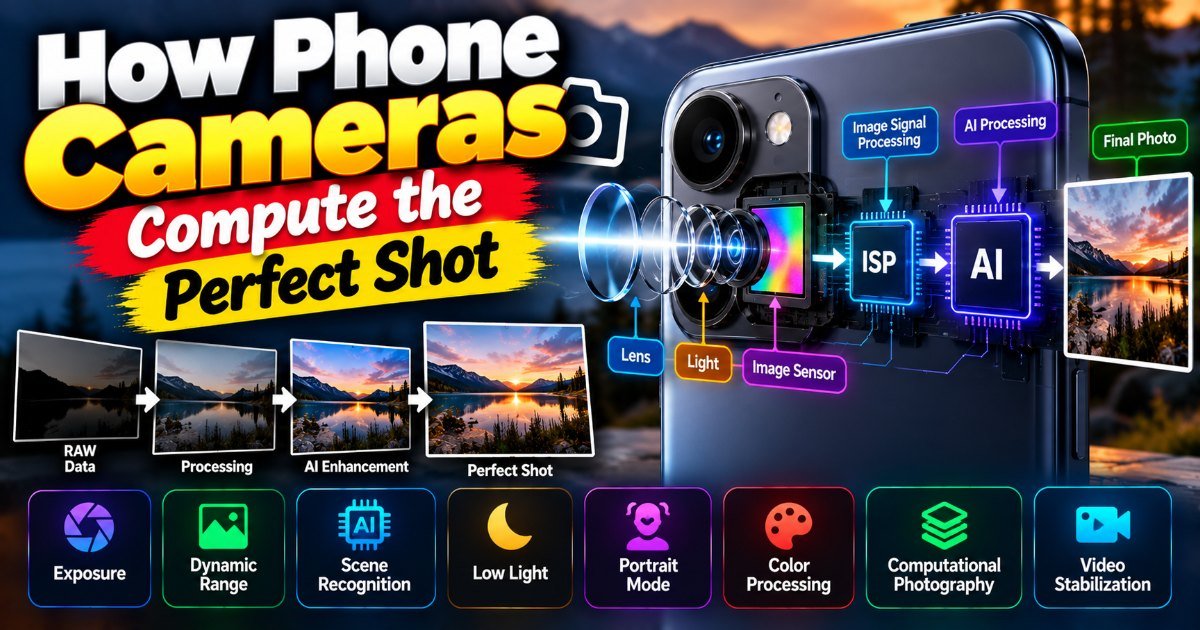
You point your phone camera at a sunset and the screen glows like a postcard. You tap the shutter. Later, when you zoom in, the colors are richer and the shadows hold detail your eyes couldn't see. That's not your phone being smug. That's computational photography doing its quiet, invisible work — and it's been doing it since around 2016, when Google's Pixel first showed the world what a single camera plus software could pull off.
What Actually Happens When You Tap the Shutter
Here's the thing: your phone isn't taking one photo. It's taking several, in the space of a heartbeat, and then it stitches them together.
Modern flagships — think iPhone 16 Pro, Galaxy S24 Ultra, Pixel 9 Pro — fire off multiple frames in quick succession, sometimes three, sometimes a dozen. Each frame captures a slightly different exposure. One catches the bright sky without blowing it out. Another digs detail out of the shadows. A third might be shot at a different focal length if the phone has multiple lenses.
Then the Neural Engine or the ISP or whichever silicon your phone has been fed all these frames, and it does something genuinely clever: it aligns them, removes the blur from your shaky hands, and merges the best parts into a single image. The whole process takes less than a second, and you probably never notice it. (You should. It's quietly one of the most impressive things your phone does.)
Night Mode: Where the Magic Gets Obvious
This is where computational photography earns its keep. You've seen the side-by-side shots — a dimly lit restaurant, and your friend's phone produces a photo that looks like someone turned on a floodlight. Sometimes it's great. Sometimes it looks like a painting someone over-processed. Both outcomes come from the same trick.
The phone holds the shutter open for a second or two (it stabilizes itself using optical image stabilization and, if you're lucky, a tripod mode). It captures multiple long-exposure frames, then uses AI to denoise them — smoothing out the grain while keeping edges sharp. Google's Night Sight, Apple's Night mode, Samsung's Night mode: same idea, different tuning. Google tends to brighten aggressively. Apple keeps things more natural, sometimes at the cost of brightness. Samsung sits somewhere in between.
Here's my honest take: if you shoot a lot in low light, the Pixel still sets the pace for pure night performance, but the gap has narrowed enough that you should pick based on the rest of the phone, not just the camera.
Portrait Mode: The Illusion of a Expensive Lens
Portrait mode is a parlor trick, and a good one. Real DSLR lenses create shallow depth of field by physics — a wide aperture physically blurs the background. Your phone has to fake it, and it does that with machine learning.
The phone identifies the subject (you, a dog, a vase) using a neural network trained on millions of photos. It then builds a depth map — a grayscale image where closer things are brighter and farther things are darker. Then it applies blur to the background, mimicking what a fast lens would do.
The catch? It gets the edges wrong sometimes. Ears vanish into the blur. Stray hairs become spaghetti. That's the tell. If you want to know whether a portrait shot is real or phone-made, look at the boundary between the subject and the background. If it's crisp and continuous, a human shot it. If it's fuzzy or has weird halos, that's the algorithm guessing.
HDR Explained: Why Your Photos Don't Look Like Real Life
HDR — High Dynamic Range — is the reason your sunset photo doesn't come out as a black silhouette. Human eyes can handle a huge range of brightness. Camera sensors can't. So the phone captures a dark frame, a medium frame, and a bright frame, then combines them so the sky isn't blown out and the foreground isn't crushed.
All three major platforms do this automatically now. Apple calls it Smart HDR (currently on version 4 or 5, depending on the model). Samsung calls it HDR10+. Google just calls it HDR. The branding is silly, but the result is the same: a photo that looks closer to what you saw.
One warning, though: HDR can flatten images. If you're after dramatic contrast, you might want to shoot in RAW and edit it yourself. The phone's job is to give you something shareable instantly. Your job is to decide if that's enough.
The AI in Your Phone Camera Is Getting Smarter
This is the part that's changing fastest. Your phone now runs on-device AI models that do things that would have required a desktop workstation five years ago.
Real-time scene detection means the phone recognizes that you're shooting a pet and adjusts the color profile accordingly. Google's Magic Editor lets you move objects around in a photo — yes, really — and it fills in the background convincingly. Apple's Photonic Engine, introduced with the iPhone 14 series and refined since, pushes computational photography deeper into the processing pipeline, improving low-light performance across the board.
The uncomfortable truth: some of these edits blur the line between what happened and what the phone thinks happened. I'm fine with a brighter face in a dark room. I'm less fine with a sky that wasn't there. Know what you're looking at when you share a photo. Your followers probably can't tell, but you can.
Key Takeaways
- Your phone takes multiple frames per shot and merges them — it's not capturing a single moment, it's computing one.
- Night mode, portrait mode, and HDR all rely on the same core trick: shoot more, then use software to pick the best parts.
- Google, Apple, and Samsung tune their processing differently — Google brightens, Apple keeps it natural, Samsung splits the difference.
- Portrait mode uses a depth map built by a neural network, and it's not perfect at edges (ears and stray hair suffer).
- AI editing tools like Magic Editor are improving fast, but they're rewriting reality. Be aware of what you're posting.
Frequently Asked Questions
Is computational photography worth it in 2026? Yes, if you want photos you can share without editing. The quality gap between phone and dedicated camera has narrowed dramatically, especially in good light. If you shoot in RAW or want full manual control, a dedicated camera still wins — but for everyday shooting, a flagship phone is more than enough.
How does night mode work without a tripod? The phone uses optical image stabilization to reduce shake, then captures several long-exposure frames and aligns them using software. It also uses AI to remove noise. The result is a bright, clean photo even when you're holding the phone by hand — though a steady hand still helps.
Does portrait mode work without multiple lenses? Yes. Modern phones can create portrait mode using a single camera and a neural network that estimates depth from the image itself. The quality has improved a lot, but dedicated depth sensors and multiple lenses still help with edge accuracy.
Can I turn off the AI processing in my camera? Partially. Most phones let you switch to a "pro" or "manual" mode where you control exposure, focus, and ISO. But even in those modes, the sensor is still doing some processing. To get truly unprocessed images, you'll need to shoot in RAW and edit on a computer.
Which phone has the best camera in 2026? There's no single answer — it depends on what you value. The Pixel 9 Pro leads in computational features and point-and-shoot simplicity. The iPhone 16 Pro excels in video and color accuracy. The Galaxy S24 Ultra offers the most zoom flexibility. Pick based on your priorities, not just the spec sheet.
How did this story feel?
Be the first to react
Written by
TechPulse Team
The TechPulse editorial team publishes clear, practical technology guides. Every article is original and written to be understood — not just skimmed.
Comments (0)
No comments yet — start the conversation!
Keep reading
How Phone Camera Processing Works: Inside a Real Camera App
You're at a concert. The stage lights are a mess — deep blues, harsh reds, and the singer's face lost in shadow. You raise your phone, and the screen shows…
Phones Without Chargers: What You Actually Lose (and Gain)
You unbox a new phone, peel the plastic, and reach for the charger. It's not there. Again. This is the reality of phones without chargers in 2026 — it's been…
How Much RAM Does a Phone Really Need?
You're on the 7:15 train, juggling three apps at once — Slack pings, your calendar reminder pops, and you're drafting an email. Your phone stutters. Again. So…